Video-Heavy SERPs: When Text Alone May Be the Wrong Format
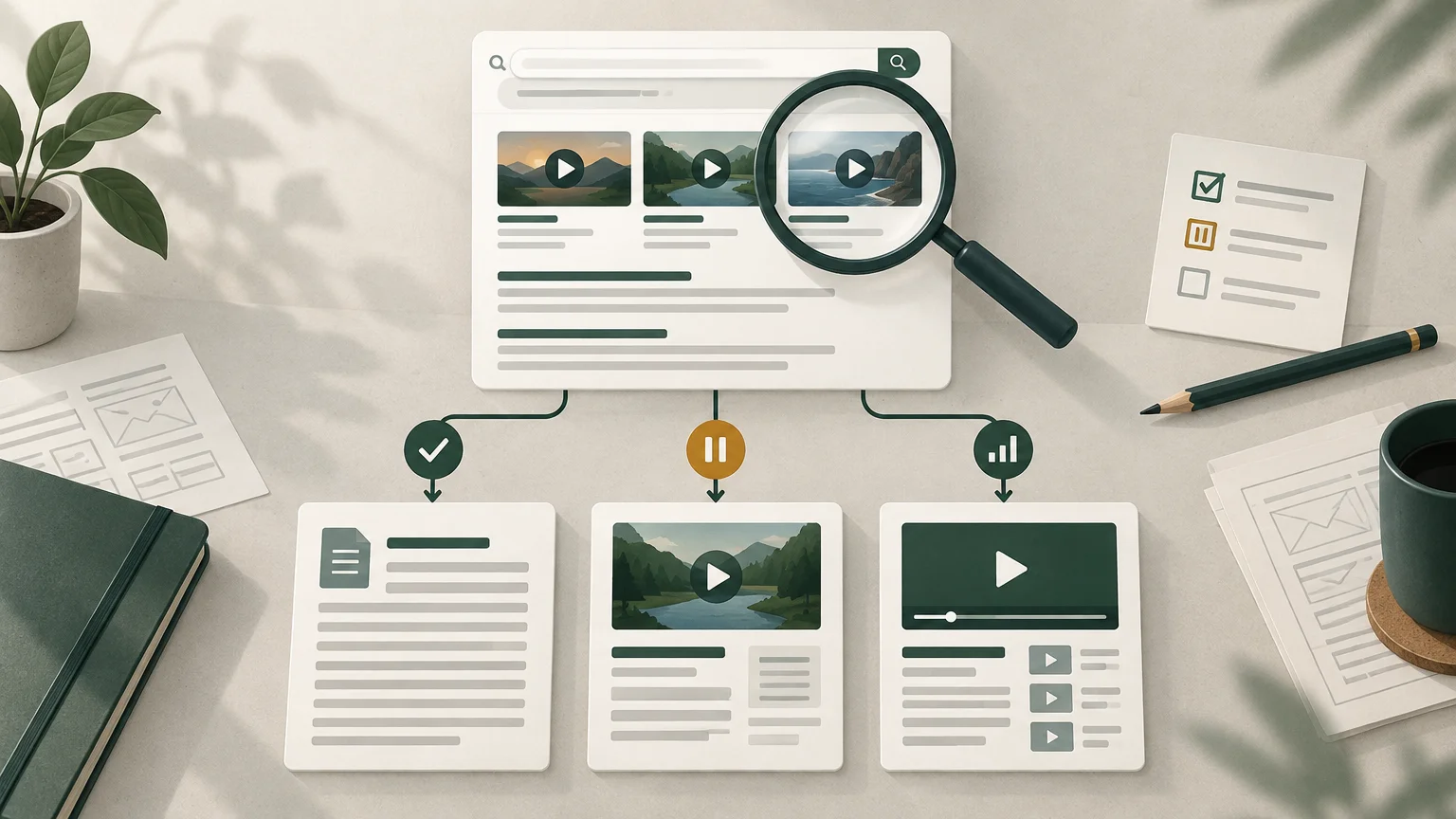
When a search results page is dominated by videos, text alone may be the wrong format. Not always, and not because Google has issued an artistic direction. The practical signal is that the query may involve motion, demonstration, sound, visual comparison, or a process that is easier to understand by watching than reading.
Treat that SERP as evidence, not an instruction. A video carousel can reveal a preferred consumption format, but it does not prove that every competing page needs a video or that a thin article with an embedded clip will suddenly perform. The real question is whether the reader’s primary task is better completed by watching, reading, comparing, or acting.
That distinction matters because “add video” is usually a production tactic pretending to be a content strategy. Before recording anything, identify what the current results demonstrate, what they leave unresolved, and whether your page should be a dedicated watch page or a text-led resource with supporting video.
A video-heavy SERP is a clue about the reader’s task
Video tends to make sense when the answer depends on sequence, appearance, movement, timing, pronunciation, sound, or a visible transformation. Queries for tying a knot, repairing a hinge, applying a finish, performing an exercise, or navigating an interface all contain actions that static prose may describe less efficiently.
But the presence of video does not erase other needs. A person may watch a repair procedure and still want a tool list, measurements, warnings, replacement-part numbers, or printable steps. Someone comparing cameras may value sample footage, yet still need a table of specifications and a written explanation of trade-offs.
Inspect the full results page rather than counting thumbnails. Look at the format, source, duration, framing, and apparent purpose of the ranking videos. Then examine the text results around them. As with SERP similarity and content decisions, visible overlap is a useful clue, not an automatic verdict about what you should publish.
- Does understanding the answer require seeing movement or hearing sound?
- Are videos dominant across the main results, or confined to one carousel?
- Do the ranking videos answer the whole query or only demonstrate one step?
- Are users likely to need exact values, links, warnings, ingredients, tools, or specifications after watching?
- Does freshness matter because an interface, product, or procedure changes frequently?
- Can your team produce a demonstration that is materially clearer or more credible than the existing results?
If the final answer to that checklist is no, commissioning video merely to imitate the SERP is unlikely to create meaningful differentiation. Format alignment matters, but so do usefulness, evidence, and execution.
Choose the page’s primary job before choosing its components
Google distinguishes a dedicated video watch page from a text-led page that contains a complementary video. A watch page has the primary purpose of showing one video. A blog post with an accompanying clip, a product page with a product video, and a category page containing several equally prominent videos are not watch pages under that guidance. Google’s video SEO documentation explains this distinction and the associated discovery requirements.
| Reader’s primary job | Better starting format | Useful supporting content |
|---|---|---|
| Watch a process or demonstration | Dedicated watch page | Concise summary, materials, steps, transcript and safety notes |
| Understand a concept in depth | Text-led article | Diagram, short explanatory clip and examples |
| Compare several options | Comparison page | Sample footage, demonstrations and specification table |
| Complete a transaction | Product or category page | Product video, dimensions, policies, compatibility and written details |
| Troubleshoot a specific failure | Hybrid guide | Diagnostic flow, screenshots, repair clip and fallback instructions |
This is not a choice between “video” and “words.” It is a choice about hierarchy. On a watch page, playback is the central action and the supporting text helps users evaluate, navigate, understand, or revisit the video. On a text-led guide, the article must remain useful without requiring playback, while the video handles the parts that genuinely benefit from motion or sound.
The weakest hybrid is a generic article wrapped around an unrelated embed. It satisfies neither task. The text does not stand on its own, the video is not central enough to create a coherent watch experience, and the page offers no reason to choose it over the original video host or a stronger written guide.
Decide whether to rebuild, supplement, or leave the page alone
Start with the existing page rather than the imagined video. Review its query-to-URL data, conversions, engagement signals appropriate to the page, backlinks, and current ranking footprint. A page that already serves research-oriented queries may need a focused demonstration, not a wholesale conversion into a watch page. A page receiving impressions for strongly visual how-to queries but few clicks may have a more fundamental format or presentation mismatch.
Use three possible decisions:
- Supplement the page when the written resource already completes the main task but one concept, step, or comparison would become clearer on video.
- Rebuild around a dedicated video when watching is plainly the main job, you can create a stronger demonstration, and the page can support that video with useful context.
- Leave the format alone when video results are incidental, your audience needs reference information, or your proposed clip would merely repeat what the prose already communicates well.
At scale, include format fit in the template and inventory review. Do not add identical decorative videos across hundreds of URLs and call it a quality improvement. A template content quality audit can separate pages that need a new primary format from pages suffering from weak information, duplication, or poor task completion.
Build a watch page that search engines can actually discover
Good editorial judgment cannot rescue a technically invisible video. Google says a watch page must be indexed and performing in Search before its video is considered for indexing; even then, page indexing does not guarantee video indexing. Google generally indexes one video per page, which makes a clear primary video especially important.
The player needs to be discoverable in rendered HTML. A video that appears only after a click, typed input, or swipe creates a discovery risk. The thumbnail and media file should also be available to Googlebot at stable URLs; blocking them can prevent indexing or restrict features such as previews and key moments.
A practical implementation checklist includes:
- Give the primary video a dedicated, indexable page with a unique title and useful surrounding copy.
- Place the visible player prominently rather than burying it beneath unrelated introductory text.
- Make the player available in rendered HTML without requiring user interaction to load it.
- Use stable, crawlable thumbnail and video-file URLs where your hosting setup permits.
- Add accurate VideoObject structured data with the required name, thumbnailUrl and uploadDate properties; provide contentUrl when possible or embedUrl as an alternative.
- Consider a video sitemap or Open Graph metadata to provide additional discovery signals.
- Provide a transcript or structured written summary for accessibility, scanning and factual reference, but do not inflate it into repetitive filler.
- Use Clip markup or SeekToAction only when timestamps and deep links genuinely work in the player.
Structured data establishes eligibility, not entitlement. It can help a search engine understand the asset, but it does not guarantee a video result, key moments, rankings, or traffic. Google’s broader guidance continues to emphasize helpful, reliable, people-first content rather than pages produced principally to attract search visits.
Do not make supporting text an afterthought
A video-led page still needs useful text. The copy should help a visitor decide whether to watch, locate the relevant segment, gather required materials, understand limitations, and take the next action. It should not be a loosely edited transcript published only to create more words on the URL.
Conversely, a text-first page should not require the video to communicate essential facts. Bing’s webmaster guidance advises that images and video reinforce the main text rather than carry the only information needed to understand a text-led page. That is a sensible editorial test independent of any one search feature: remove the video temporarily and ask whether the remaining page still fulfills its declared job.
For a dedicated watch page, reverse the test. If the video disappeared, would the page lose its central purpose? If not, it may actually be an article with an embed. Naming the format honestly helps editors avoid muddled briefs and helps designers establish the right visual hierarchy.
Measure indexing, search demand and page performance separately
Video indexing and video performance are different diagnostic layers. The Search Console Video Indexing report identifies pages where Google detected a video and reports indexing issues. It is page-oriented and should not be treated as a complete inventory of unique video assets. Google’s Video Indexing report documentation clarifies what the report counts and diagnoses.
The Performance report answers a different question. Filter by the Video search type, then inspect impressions, clicks, click-through rate, queries, pages, countries and dates. High impressions with low CTR may indicate an unappealing result, weak query alignment, or a SERP that answers the need without a click; Google recommends interpreting the pattern in the context of the actual results page.
Use a before-and-after comparison with a defined change date. Track the rewritten or rebuilt URLs as a cohort, while recording other changes that could affect performance. Useful measures include valid indexed video pages, video-search impressions and clicks, web-search performance for the same URLs, player starts, meaningful watch milestones, completion rate, and the page’s real conversion or next-step action.
Do not claim success because indexed-video counts rose while qualified visits or task completion remained flat. Equally, do not declare failure after a week if crawling, indexing, and demand vary across the tested pages. Define the observation window in advance and compare like with like.
A worked decision: the software tutorial that ranks as text
Imagine a written tutorial ranking near the bottom of page one for “how to mask a moving object.” The SERP contains several prominent videos. The article has screenshots and accurate steps, but the crucial action involves tracking motion across frames. Search Console shows impressions but a relatively weak CTR for that query cluster.
The correct response is not simply to embed a generic software overview. Produce a focused demonstration of the exact tracking process, show the failure cases, and create a dedicated watch page if watching is the primary task. Add timestamps, shortcut keys, version information, a concise step list, and links to any required project files. Keep or revise the original written guide if it continues to serve readers seeking a scannable reference.
Then test the URLs as distinct tools rather than near-duplicates. The watch page should own the demonstration intent; the written guide should own the reference intent. If both pages chase the same queries with the same promise and almost the same information, the project has created internal ambiguity instead of format coverage.
The format decision comes before the video SEO checklist
A video-heavy SERP should trigger investigation, not reflexive production. Determine whether watching is central to the task, whether existing videos satisfy it, and whether your team can contribute a clearer demonstration, stronger evidence, or more useful supporting material.
If the answer is yes, build a genuine watch experience and make the primary video technically discoverable. If the task remains primarily comparative, referential, or transactional, keep the page text-led and use video only where it improves understanding. The winning format is not the one that most closely imitates the SERP. It is the one that completes the reader’s job while giving search engines a clear, accessible page to evaluate.
Frequently Asked Questions
Does a video-heavy SERP mean I must produce a video?
No. It suggests that watching may suit the query, but you still need to determine whether users primarily need a demonstration, written reference, comparison, or transaction page.
When should I create a dedicated video watch page?
Use one when watching a single video is the page’s primary purpose and you can offer a meaningfully useful demonstration. Google distinguishes that format from an article or product page with a supporting clip.
When is a text-led page still the better format?
Keep text primary when users need specifications, warnings, measurements, printable steps, comparisons, or other information they must scan and revisit. Video can support the page without carrying its essential facts.
Can I improve an existing article by embedding any relevant video?
Not meaningfully. A generic or loosely related embed usually creates a weak hybrid: the article gains little, the video lacks a coherent watch experience, and neither format has a clear job.
What does Google need to discover a video?
The player should be available in rendered HTML without requiring a click, typed input, or swipe. The thumbnail and media file should also use stable URLs accessible to Googlebot.
Does VideoObject structured data guarantee a video result?
No. Structured data can improve discovery and establish eligibility, but it does not guarantee indexing, rankings, key moments, or a particular search appearance.
How should I diagnose video indexing problems?
Use Search Console’s Video Indexing report to review video detection and indexing issues. Treat it as a page-oriented diagnostic report rather than a complete inventory of unique video assets.
How should I measure whether a video-led rebuild worked?
Compare a defined URL cohort before and after the change. Review indexed video pages, video-search impressions and clicks, web-search performance, player engagement, and the page’s real conversion or next-step action rather than declaring victory from indexing alone.
References
- Video SEO Best Practices | Google Search Central | Documentation | Google for Developers
- Video (VideoObject, Clip, BroadcastEvent) Schema Markup | Google Search Central | Documentation | Google for Developers
- Video indexing report – Search Console Help
- How are you performing on Google? – Search Console Help
- Creating Helpful, Reliable, People-First Content | Google Search Central | Documentation | Google for Developers
- Webmaster Guidelines – Bing Webmaster Tools